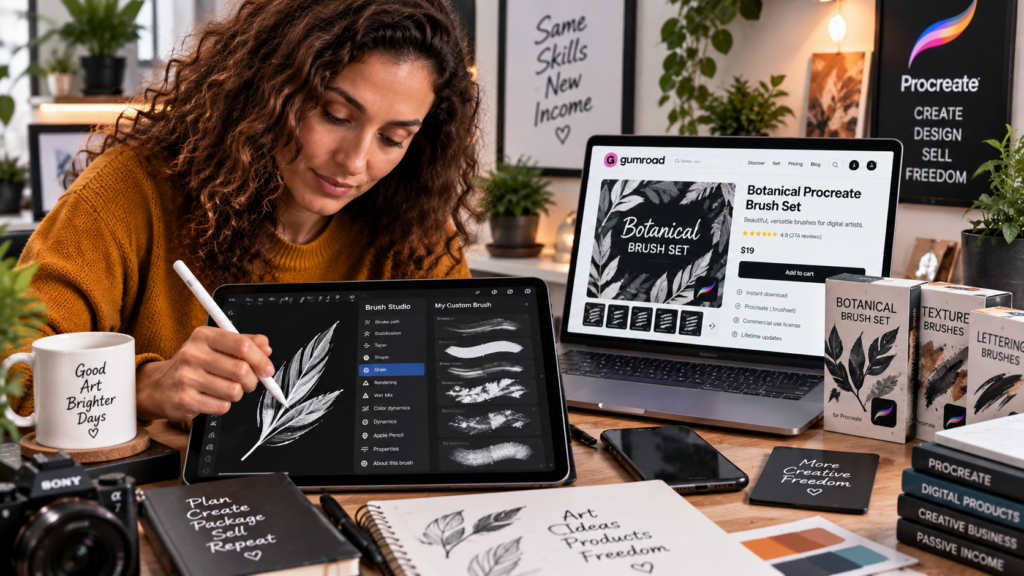
If you already use Procreate, you don’t need to look very far to see the digital-product opportunity: Procreate lets you create and share custom brushes and brush sets, including exporting brush sets as shareable files. Procreate’s own documentation even notes that creators can sell their unique custom brush sets online. :contentReference[oaicite:0]{index=0} If you’re ready to explore the broader workflow of creating and selling digital products through Gumroad, Gumroad Engine is designed to help streamline digital-product creation and publishing.
The important distinction is this: creating a good Procreate brush is only the first step. You also need to package it, demonstrate its value, choose appropriate licensing, create a product listing, and get it in front of the right buyers. That’s where a brush hobby can start becoming a digital-product business.
Can You Create Procreate Brushes to Sell?
Yes. Procreate supports creating, organizing, sharing and exporting custom brushes and Brush Sets. Its current documentation identifies .brush, .brushset and .brushlibrary formats and explains how custom brushes and sets can be exported and shared. :contentReference[oaicite:1]{index=1}
Procreate also explicitly notes that original Brush Sets can be sold online. :contentReference[oaicite:2]{index=2}
That means the technical foundation already exists inside the application:
- Create the brush.
- Test the brush.
- Organize related brushes into a set.
- Export the set.
- Package the files for customers.
- Create a product listing.
- Sell the digital product.
The real opportunity is learning how to do each part well.
What Makes a Procreate Brush Worth Selling?
Not every brush needs to be revolutionary.
It needs to be useful to a specific artist for a specific purpose.
Think about the problem before you think about the brush.
Does an illustrator need better foliage?
Does a lettering artist need a particular stroke texture?
Does a concept artist need fast sketching tools?
Does a digital painter want watercolor effects?
Does a character artist need specialized hair brushes?
The strongest products start with a clear answer to those questions.
Procreate Brush Ideas You Can Create
There are countless directions you can take a brush product. Current Gumroad stores demonstrate categories ranging from visual-effects brushes and tattoo brushes to dual-texture collections, color palettes and large commercial-license bundles. :contentReference[oaicite:3]{index=3}
Texture Brushes
Create brushes designed around paper, grain, fabric, concrete, foliage or other surface effects.
Watercolor Brushes
Build a collection around watercolor-style edges, washes, textures and blending effects.
Ink and Linework Brushes
Focus on line variation, sketching, comic work, illustration or lettering.
Hair and Fur Brushes
Specialized brushes can speed up repetitive details such as hair, fur and fine texture.
Nature Brushes
Think leaves, grass, trees, flowers, clouds, rocks and other recurring illustration elements.
Special-Effect Brushes
Brushes for smoke, fire, neon, glitter, sparks, halftones and other effects can become focused niche products.
Brush Bundles
Once you have several related sets, you can organize them into a larger collection. Current Gumroad examples show creators selling individual packs alongside larger bundles and commercial-license versions. :contentReference[oaicite:4]{index=4}
Step 1: Start With a Specific Procreate Audience
This is where most new creators should begin.
Don’t start with:
“What brush should I make?”
Start with:
“Who am I making this brush for?”
A brush designed for children’s-book illustrators is different from one designed for tattoo artists. A brush for architectural sketching is different from one designed for fantasy concept art.
The more specific the audience, the easier it becomes to make decisions about:
- Brush style
- Product name
- Product previews
- Packaging
- Pricing
- Marketing
- Future products
Step 2: Create Your First Custom Brush
Inside Procreate, create a new brush and experiment with the brush properties until it produces the result you want.
Don’t rush this part.
Test the brush at different sizes. Test pressure sensitivity. Test opacity. Test different strokes. Test it against actual artwork rather than only looking at the brush settings.
A brush becomes a product when you can demonstrate what it helps the customer accomplish.
Step 3: Test the Brush in Real Artwork
This is one of the most important steps in the entire process.
Don’t sell the promise.
Show the result.
Create several examples using the brush.
For example:
- Close-up texture examples
- Finished illustrations
- Before-and-after comparisons
- Different pressure settings
- Different brush sizes
- Examples showing multiple brushes from the set
Your buyer isn’t really purchasing a file.
They’re purchasing the creative result that file helps them achieve.
Step 4: Organize the Brushes Into a Set
Once you have multiple related brushes, organize them into a coherent Brush Set.
Procreate supports custom Brush Sets, and its documentation explains that a custom set can be exported as a single .brushset file containing the brushes. :contentReference[oaicite:5]{index=5}
That is useful because your customer can receive a clearly packaged collection rather than a confusing collection of individual files.
Give the set a meaningful name.
Group brushes logically.
Remove duplicates.
Test the final exported version before selling it.
Step 5: Export Your Procreate Brush Product
Procreate supports exporting individual brushes as .brush files and Brush Sets as .brushset files. It also supports exporting multiple brushes together. :contentReference[oaicite:6]{index=6}
For a commercial product, keep your master files organized separately from the customer-facing files.
Maintain:
- Your original brush files
- The final customer download
- Preview artwork
- Product images
- License documentation
- Installation instructions
- Product description
That small amount of organization becomes increasingly valuable when you start creating multiple products.
Step 6: Create a Professional Product Package
A good digital product should feel like a product—not a random file attached to an email.
Your package could include:
- The Procreate Brush Set
- Installation instructions
- A quick-start guide
- Brush descriptions
- Example artwork
- License information
- Support information
You can even add a short tutorial showing customers how you use the brushes.
The objective is simple:
Make the buyer’s first five minutes with the product easy.
Step 7: Decide What License You Will Offer
This is where you need to be precise.
A customer buying your brush set does not automatically receive the right to redistribute your original brush files.
You need to clearly define what buyers can and cannot do with your product.
For example, you may distinguish between:
- Personal artwork
- Commercial artwork
- Client projects
- Educational use
- Redistribution
- Resale of the original brush files
- Inclusion in another downloadable product
Existing Gumroad brush products demonstrate that these permissions can vary. Some products explicitly allow commercial use while prohibiting redistribution or resale of the original brush files. :contentReference[oaicite:7]{index=7}
Never assume that “commercial use” means “resale rights.”
Step 8: Create Your Gumroad Product Listing
Gumroad is designed for creators who make and sell products, and its product dashboard lets creators create and manage their products. :contentReference[oaicite:8]{index=8}
Your product page should answer the buyer’s questions quickly.
What Should the Listing Explain?
- What the brush pack does
- Who it is designed for
- How many brushes are included
- What file format buyers receive
- How to install the brushes
- What Procreate version is supported
- What the license permits
- What the buyer can create with the brushes
Gumroad also supports product versions, allowing creators to offer different versions of a product with different content or pricing. :contentReference[oaicite:9]{index=9}
That could be useful for structuring different product tiers where appropriate—for example, a basic pack and a larger collection.
Step 9: Build a Product Preview That Sells the Result
Your preview images can make or break the product.
Don’t simply photograph the brush library.
Show what happens after the brush is used.
For a watercolor pack, show watercolor artwork.
For a foliage pack, show foliage inside a finished illustration.
For lettering brushes, show finished lettering.
For texture brushes, show the texture applied to an actual composition.
The buyer should understand the transformation within seconds.
Step 10: Price the Product Around the Value of the Solution
There isn’t one universal price for Procreate brushes.
Current Gumroad listings show substantial variation, from free products to individual paid packs, commercial-license versions and larger bundles. One current creator’s store, for example, offers free demos, $5 brush products, $9 commercial-license products, $15 packs and $30 commercial-license collections alongside an all-in bundle. :contentReference[oaicite:10]{index=10}
That gives creators room to experiment with different product structures.
You might have:
- A free starter pack
- A low-cost individual collection
- A larger themed bundle
- A premium commercial-use version
- An all-in collection
The important thing is to make the differences between products obvious.
Can You Sell More Than Procreate Brushes?
This is where the real opportunity starts.
If you already understand Procreate users, you have an audience.
And an audience doesn’t have to buy only one type of product.
Consider the possibilities:
- Brush packs
- Texture collections
- Color palettes
- Drawing guides
- Illustration tutorials
- Workflow checklists
- Digital-art ebooks
- Reference guides
- Creative planners
- Templates
One audience can support multiple related products.
That changes the business model completely.
You’re no longer asking:
“How do I sell one brush pack?”
You’re asking:
“How do I build a catalog of useful digital products for this audience?”
Where Gumroad Engine Fits Into This Strategy
Creating the actual Procreate brush is a specialized creative task. Gumroad Engine isn’t presented as a Procreate brush-generation tool.
Its relevance comes when you start expanding the product ecosystem around your audience.
Suppose you have an audience interested in digital art.
You could create a brush pack yourself and then develop complementary information products around the same audience:
- A Procreate workflow guide
- An illustration ebook
- A digital-art checklist
- A creative planning guide
- A beginner’s Procreate handbook
- A niche-specific digital-art resource
Gumroad Engine is positioned around creating digital products such as ebooks, guides, planners, checklists and journals from a niche or keyword, while also providing supporting sales assets, licensing material and a workflow for publishing to a connected Gumroad store.
That means the strategic connection is audience expansion.
Your Procreate expertise can attract the audience.
Your brush products can serve that audience.
And additional digital products can serve other problems that the same audience has.
See the complete Gumroad Engine review to explore its features, pricing, OTOs and bonuses →
Watch the Gumroad Ecosystem
Gumroad is built around creators making and selling products directly to their audiences. Its platform supports digital products and gives creators tools for managing products, customers and sales.
Explore Gumroad Engine and see how it can streamline your wider digital-product workflow →
How to Turn One Procreate Brush Into a Product Line
Let’s make the strategy practical.
Imagine you create a useful watercolor brush.
Don’t stop there.
Turn it into a small collection.
Then create a larger watercolor bundle.
Then create a guide explaining watercolor techniques in Procreate.
Then create a checklist for digital watercolor workflows.
Then create a beginner ebook.
Now you aren’t selling one file.
You’re building a product ecosystem around one audience.
That is the mindset shift that can turn a creative skill into a digital-product business.
How to Make Your Procreate Brush Product Stand Out
Focus on a Clear Outcome
“50 brushes” is a specification.
“Create realistic watercolor textures faster” is a benefit.
Lead with what the buyer can accomplish.
Use a Specific Niche
A brush pack for “everything” is difficult to position.
A brush pack specifically designed for botanical illustration, comic shading or hand lettering is much easier to understand.
Show Real Examples
Use finished artwork to demonstrate what the brushes can do.
Make Installation Simple
Procreate’s current documentation explains that users can import .brush, .brushset and .brushlibrary files through the Brushes interface or compatible file workflows. :contentReference[oaicite:12]{index=12}
Give your customers clear instructions that match the file format you’re delivering.
Make the License Obvious
Don’t make customers hunt through a PDF to determine whether they can use the brushes commercially.
State the important permissions clearly on the product page and provide the full license with the product.
Common Mistakes When Selling Procreate Brushes
Making a Generic Brush Pack
Specific products are easier to explain and market than collections without a clear purpose.
Ignoring the Preview
The buyer needs to see what the brushes actually produce.
Being Vague About Licensing
Unclear licensing creates unnecessary uncertainty for buyers and can create problems for the creator.
Creating One Product and Stopping
A single brush pack can be the beginning rather than the end of your catalog.
Overcomplicating the Customer Experience
Clear files, clear instructions, clear licensing and clear product descriptions make the product easier to buy and easier to use.
Frequently Asked Questions
Can I create my own Procreate brushes and sell them?
Yes. Procreate supports creating, organizing, sharing and exporting custom brushes and Brush Sets, and its documentation specifically notes that original custom sets can be sold online. :contentReference[oaicite:13]{index=13}
What file format do Procreate brushes use?
Procreate currently supports .brush, .brushset and .brushlibrary formats, as well as importing Adobe Photoshop .abr brushes. :contentReference[oaicite:14]{index=14}
How do I export a Procreate brush set?
Procreate’s Brush Library allows creators to share custom Brush Sets, which are exported as a .brushset file containing the brushes in the set. :contentReference[oaicite:15]{index=15}
Can I sell Procreate brushes on Gumroad?
Yes. Gumroad is designed for creators who make and sell products, and current Gumroad stores include Procreate brush packs, bundles and commercial-license products. :contentReference[oaicite:16]{index=16}
Can buyers use my Procreate brushes commercially?
That depends on the license you provide. You can define the permitted uses, but you should clearly distinguish commercial use in artwork from redistribution or resale of the original brush files.
How should I package Procreate brushes for sale?
A professional package can include the brush or Brush Set, installation instructions, example artwork, a product guide and clearly stated licensing terms. The exact contents depend on the product and audience.
Can I sell a Procreate brush bundle?
Yes. Current Gumroad stores demonstrate individual Procreate packs, larger bundles and commercial-license versions being offered as separate products. :contentReference[oaicite:17]{index=17}
Can Gumroad Engine create Procreate brushes?
Gumroad Engine is not positioned as a Procreate brush-generation application. Its purpose is broader digital-product creation, including products such as ebooks, guides, planners and checklists, plus supporting sales and licensing assets and a Gumroad publishing workflow.
Final Thoughts
Creating Procreate brushes to sell on Gumroad is not just about making a clever brush.
It’s about solving a specific creative problem.
Package the solution.
Show the result.
Explain the license.
Make buying and installation simple.
Then think bigger.
One brush can become a pack.
A pack can become a bundle.
A bundle can lead to a guide.
A guide can become an ebook.
And an audience that buys one useful digital product can potentially become an audience for many related products.
That’s the real opportunity behind the Gumroad Procreate brushes market.
If your bottleneck eventually becomes creating the supporting digital products around your niche, Gumroad Engine is worth investigating as part of that broader workflow.
Read the complete Gumroad Engine review for the features, pricing, OTOs, bonuses and full workflow →