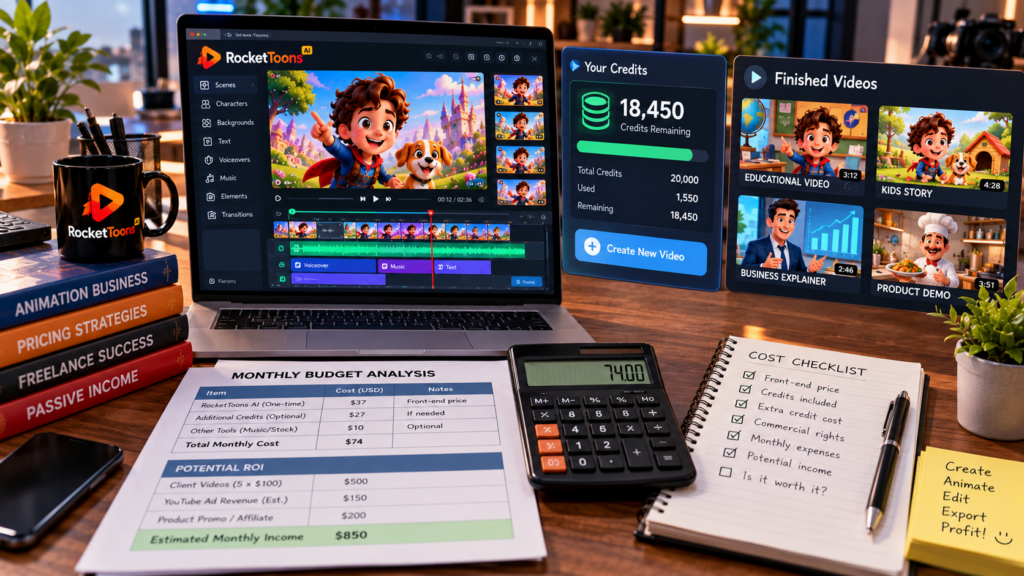
The real cost per finished video with RocketToons AI depends on more than its advertised purchase price. You need to account for the initial software cost, optional upgrades, AI credits, video length, rendering limits, editing time, and the number of usable videos you actually produce. RocketToons AI has been promoted with a $37 one-time front-end offer, but that does not automatically mean every feature or unlimited production capacity is included. If you are considering it, check the RocketToons AI offer here and calculate your likely production costs before buying.
Why the Purchase Price Is Not the Real Cost Per Video
A common mistake when evaluating AI video software is dividing the advertised purchase price by the number of videos you hope to create.
That calculation can be misleading because not every generated video will necessarily be ready to publish. Some projects may require additional generations, scene corrections, script improvements, voice adjustments, or editing.
RocketToons AI advertises features such as AI script assistance, customizable characters, scene creation, AI voices, soundtrack options, storyboard previews, and different export formats.
These capabilities may help streamline production, but your actual cost depends on how efficiently you use them and which features are included in your selected package.
What Factors Affect the Cost Per Finished RocketToons AI Video?
1. Initial Software Purchase
The front-end RocketToons AI offer has been advertised at $37 one-time.
This is the starting cost to consider, subject to the current checkout price and terms. Before purchasing, check exactly which features, credits, and usage allowances are included.
Do not assume that the initial purchase automatically provides access to every advertised upgrade or expanded production feature.
2. Optional Upgrades
Additional upgrades may provide capabilities that are useful for specific production requirements.
For example, advertised upgrade features include expanded production allowances, additional visual styles, advanced editing capabilities, publishing tools, and other creative options.
However, you should not automatically add every upgrade to your production budget. Include only the upgrades that you genuinely need.
If the initial package already supports your intended workflow, purchasing additional features may not improve your cost per finished video.
3. AI Credits and Generation Limits
AI generation limits can influence production costs.
A video may require multiple attempts before the scenes, characters, and dialogue meet your expectations. If additional generations consume credits, the number of attempts required can affect your effective cost.
Before purchasing, check:
- How many credits are included.
- Whether different generation tasks consume different amounts.
- Whether unused credits expire.
- What happens when your available credits run out.
- Whether additional credits can be purchased.
The current credit allowances and generation costs should be verified in the actual offer rather than assumed.
4. Video Length and Production Complexity
A short cartoon explainer and a longer animated story do not necessarily require the same amount of production effort.
Longer videos may involve more scenes, dialogue, characters, and opportunities for revisions.
A simple 30-second promotional cartoon may be relatively straightforward, while a five-minute educational video could require more script development, scene planning, and quality checks.
The more complicated the project, the more important it becomes to measure your actual production effort.
5. Editing and Revision Time
Your time is part of the production cost, even when the software is purchased through a one-time offer.
You may need to correct dialogue, improve scene transitions, adjust character actions, refine voiceovers, or regenerate sections that do not meet your standards.
RocketToons AI advertises scene-level controls and dialogue adjustments, which may help users refine their projects.
However, the amount of editing required will depend on the quality of the generated output and your expectations.
6. Storage, Exporting, and Other Restrictions
Check whether your selected package includes the export resolution, storage duration, video length, and file formats you need.
If a particular production requirement depends on an optional upgrade, include that cost when calculating the total investment.
A low initial purchase price is less attractive if your regular workflow requires several additional purchases.
How to Calculate Your Real Cost Per Finished Video
The simplest method is to divide your total production expenses by the number of videos you successfully complete.
Cost per finished video = Total production cost ÷ Number of finished videos
Your total production cost can include:
- Initial software purchase.
- Optional upgrades you actually use.
- Additional AI credits or usage charges.
- Other necessary production expenses.
- The value of your production time, if calculating a fully loaded business cost.
Here is a hypothetical example to demonstrate the calculation.
Example: Producing 20 Finished Videos
Assume the following figures purely for illustration:
| Expense | Example cost |
|---|---|
| Initial software purchase | $37 |
| Optional upgrade | $47 |
| Additional production expenses | $16 |
| Total investment | $100 |
| Finished videos | 20 |
| Cost per finished video | $5 |
In this hypothetical example, the effective software and production expense is $5 per finished video.
This is not a verified RocketToons AI usage calculation. It simply demonstrates how to calculate your own cost using the actual expenses and output you experience.
Use This Cost Per Video Calculator
You can enter your own figures below to estimate the cost of producing each finished video.
{@body const [software,setSoftware] = DIL.useState(“37”)}
{@body const [upgrades,setUpgrades] = DIL.useState(“47”)}
{@body const [credits,setCredits] = DIL.useState(“0”)}
{@body const [other,setOther] = DIL.useState(“16”)}
{@body const [count,setCount] = DIL.useState(“20”)}
{@body const total = [software,upgrades,credits,other].reduce((s,v)=>s+(Number(v)||0),0)}
{@body const valid = Number(count)>0}
**Enter your estimated costs (USD)**
{:else}
{/if}
How to Reduce Your Cost Per Finished Video
If you want to make AI cartoon production more economical, focus on reducing wasted generations and unnecessary editing.
- Plan scripts before generating videos. A clear script reduces avoidable changes later.
- Reuse suitable characters. Develop recurring characters for related projects when the platform supports it.
- Preview storyboards. Review the structure before committing to the complete production.
- Keep scenes focused. Avoid unnecessary complexity that increases production time.
- Choose upgrades carefully. Purchase additional capabilities only when they solve a real production problem.
- Track finished output. Measure publishable videos, not simply the number of generations.
For a closer look at the advertised features, pricing, optional upgrades, and buying considerations, read the complete RocketToons AI review and product breakdown.
How Does Cost Per Video Affect a Video Business?
Understanding production costs is especially important if you plan to sell animated videos to clients.
For example, a freelancer needs to consider more than the software expense when setting a service price. Scriptwriting, revisions, client communication, project management, and delivery time all contribute to the real cost of providing the service.
A simple pricing formula is:
Client price = Production costs + Labour value + Business expenses + Profit margin
Never price a video service based only on the cost of the software. Your creative work and the value delivered to the client also matter.
Frequently Asked Questions
How much does RocketToons AI cost?
RocketToons AI has been promoted with a $37 one-time front-end offer. Verify the current checkout price, included features, optional upgrades, and any additional charges before purchasing.
Does RocketToons AI have unlimited video generation?
Do not assume unlimited generation is included. Check the current package’s credit allowances, rendering restrictions, and any upgrade requirements.
Are RocketToons AI upgrades necessary?
Not necessarily. The need for upgrades depends on your production goals, desired features, and the limitations of your initial package.
How do I calculate the cost of an AI-generated video?
Add your software expenses, upgrades, additional credits, and other production costs. Divide that total by the number of finished, usable videos you create.
Can I make money selling videos created with RocketToons AI?
Potentially, if your applicable license permits commercial client work. You should also account for production time, revisions, business expenses, and the quality of your finished videos when setting prices.
Final Verdict: Calculate the Real Cost Before Buying
The real cost per finished RocketToons AI video is determined by your total investment and the number of usable videos you actually produce, not simply the advertised purchase price. The $37 front-end offer may provide an accessible starting point, but optional upgrades, generation allowances, editing time, and other production expenses can affect your final economics. Start with a realistic project, measure how many attempts and revisions it requires, and use those figures to calculate your actual cost per video. That will give you a much better basis for deciding whether the platform makes financial sense for your content creation or video business. For the complete breakdown of advertised features, pricing, and optional upgrades, visit the full RocketToons AI review at Product Oasis.